Blog

  • The Top 5 Password Managers

    The Top 5 Password Managers

    In an age where we juggle countless online accounts and sensitive information, the significance of robust password management cannot be overstated. Password managers provide a secure and user-friendly solution to the difficulties of managing multiple passwords. In this article, we will explore the top 5 password managers available today, ensuring that your digital life remains well-protected.

    What is a Password Manager?

    A password manager is a software tool that securely stores and organizes all your passwords in a single encrypted vault. It eliminates the need for users to memorize numerous complex passwords and helps create strong, unique passwords for each account.

    Importance of Password Managers

    The importance of using a password manager cannot be emphasized enough due to the following reasons:

    1. Enhanced Security: Password managers generate and store strong, unique passwords, minimizing the risk of password-related security breaches.
    2. Convenience: With a password manager, you only need to remember one master password to access all your accounts.
    3. Time-Saving: Password managers auto-fill login credentials, saving time and reducing frustration.

    Criteria for Selecting a Password Manager

    When selecting a password manager, take into account the following factors:

    1. Security Features: Look for AES-256 encryption and multi-factor authentication for top-notch security.
    2. User-Friendly Interface: A user-friendly interface ensures easy navigation and seamless integration.
    3. Cross-Platform Support: Opt for a password manager that works across various devices and platforms.
    4. Password Generator: A strong password generator helps create complex passwords effortlessly.
    5. Cloud Syncing: Cloud syncing allows access to your passwords across multiple devices.

    Top 5 Password Managers

    Let’s explore the top 5 password managers known for their security and user experience:

    Password Manager 1: 1Password

    1Password is a popular password manager that is known for its ease of use and security features. It offers a wide range of features, including secure password generation, password sharing, and secure notes. 1Password also has a strong track record of security, and it has been independently audited by security experts.

    Password Manager 2: LastPass

    LastPass is another popular password manager that is known for its security and affordability. It offers a free plan with basic features, and paid plans with more features. LastPass is also highly secure, and it has been independently audited by security experts.

    Password Manager 3: Dashlane

    Dashlane is a password manager that is known for its security and user interface. It offers a variety of features, including secure password generation, password sharing, secure notes, and a VPN service. Dashlane is also highly secure, and it has been independently audited by security experts.

    Password Manager 4: Bitwarden

    Bitwarden is a free and open-source password manager that is known for its security and affordability. It offers a wide range of features, including secure password generation, password sharing, secure notes, and two-factor authentication. Bitwarden is also highly secure, and it has been independently audited by security experts.

    Password Manager 5: Keeper

    Keeper is a password manager that is known for its security and advanced features. It offers a variety of features, including secure password generation, password sharing, secure notes, encrypted file storage, and two-factor authentication. Keeper is also highly secure, and it has been independently audited by security experts.

    In conclusion, A reliable password manager is an invaluable tool for ensuring the security of your online accounts. By entrusting your passwords to one of the top 5 password managers, you can enjoy enhanced protection, convenience, and peace of mind. Choose the one that aligns with your needs and embrace the ease of secure password management.

    FAQs (Frequently Asked Questions)

    1. Are password managers safe to use? Yes, reputable password managers employ strong encryption and security measures to protect your data.
    2. Can password managers be hacked? While no system is completely invulnerable, password managers are designed to withstand hacking attempts with robust encryption.
    3. What if I forget my master password? Forgetting your master password can lead to data loss. Some password managers offer account recovery options, while others do not store master passwords.
    4. Can I use a password manager on multiple devices? Yes, most password managers offer cross-platform support, allowing you to access your passwords on multiple devices.
    5. Are password managers worth the cost? The added security and convenience make password managers well worth the investment for individuals and businesses alike.
  • The Latest Cyber Threats and How to Avoid Them

    The Latest Cyber Threats and How to Avoid Them

    The ever-changing nature of cyber threats makes it challenging to stay updated with the latest trends. However, there are a few things you can do to protect yourself from the most common cyber threats.

    In this article, we will discuss the latest cyber threats and how to avoid them. We will also provide some tips on how to stay safe online.

    The Latest Cyber Threats

    Some of the latest cyber threats include:

    • Phishing: Phishing is a type of attack where the attacker sends a fraudulent email or text message that appears to be from a legitimate source. The email or text message will often contain a link that, when clicked, will take the victim to a fake website that looks like the real website of the company. After the user enters their personal details on the fraudulent site, the attacker can steal the information.

    For example, you might receive an email that appears to be from your bank, asking you to click on a link to update your account information. If you click on the link, you will be taken to a fake website that looks like your bank’s website. If you enter your account information on the fake website, the attacker will be able to steal your account information.

    • Malware: Malware refers to malicious software specifically designed to damage or disrupt computer systems. Malware can be installed on a computer through a variety of ways, including clicking on a malicious link, opening an infected attachment, or downloading a file from an untrusted source. After malware is installed on a computer, it has the potential to steal personal information, corrupt files, or even gain unauthorized control over the computer.

    For example, you might download a file from a file-sharing website that is infected with malware. Upon opening the file, the malware will be installed on your computer. The malware could then steal your personal information, such as your credit card number or Social Security number.

    • Ransomware: Ransomware is a form of malware that encrypts the victim’s files and demands a ransom payment for decryption. Ransomware attacks are often carried out through phishing emails or drive-by downloads.

    For example, you might receive an email that appears to be from a shipping company, saying that you have a package that needs to be paid for. If you click on the link in the email, you will be taken to a website that looks like the shipping company’s website. However, the website is actually a fake website that has been set up by the attackers. Once you enter your credit card information on the fake website, the attackers will steal your credit card information and encrypt your files. The attackers will then demand a ransom payment in order to decrypt your files.

    • Data breaches: A data breach is an event where sensitive data is exposed to unauthorized individuals. Data breaches can occur through a variety of ways, including hacking, phishing, and social engineering. When a data breach occurs, the victim’s personal information, such as their Social Security number, credit card number, or passwords, can be exposed.

    For example, a company might be hacked and its customer database stolen. The hackers could then sell the customer database to other criminals, who could use the information to commit identity theft.

    How to Avoid Cyber Threats

    There are a number of things you can do to avoid cyber threats:

    • Be careful what you click on: Don’t click on links in emails or text messages from senders you don’t know. Even if the email or text message looks like it’s from a legitimate source, it could be a phishing attempt.

    If you’re not sure whether a link is safe, hover your mouse over the link without clicking on it. The URL of the link will be visible in the bottom left corner of your browser. If the URL doesn’t look like it belongs to a legitimate website, don’t click on the link.

    • Be careful what you download: Exercise caution when downloading files and limit downloads to trusted sources only. If you’re not sure whether a file is safe, don’t download it.

    If you do download a file, scan it with antivirus software before opening it.

    • Keep your software up to date: Regularly update your computer’s software, including the operating system, web browser, and other applications, to receive security patches that safeguard your system from malware.
    • Use strong passwords: Ensure strong passwords for all your online accounts by using a combination of at least 12 characters, including uppercase and lowercase letters, numbers, and symbols.

    Don’t use the same password for multiple accounts. If one of your accounts is compromised, the attacker won’t be able to access your other accounts if they have different passwords.

    • Be aware of social engineering attacks: Social engineering attacks are attempts to trick you into giving up your personal information or clicking on a malicious link. Be aware of these attacks and don’t fall for them.

    Tips for Staying Safe Online

    In addition to the tips above, here are a few other tips for staying safe online:

    • Use a firewall: Installing a firewall can safeguard your computer against unauthorized access.
    • Use antivirus software: Having antivirus software installed can assist in identifying and eliminating malware from your computer.
    • Be careful what you share online: Don’t share personal information online, such as your Social Security number, credit card number, or passwords.
    • Be aware of the latest cyber threats: Stay up-to-date on the latest cyber threats so you can protect yourself from them.

    Cyber threats are a serious problem, but there are a number of things you can do to protect yourself. By following the tips in this article, you can help keep your computer and personal information safe.

  • How to Spot a Smishing Text Message

    How to Spot a Smishing Text Message

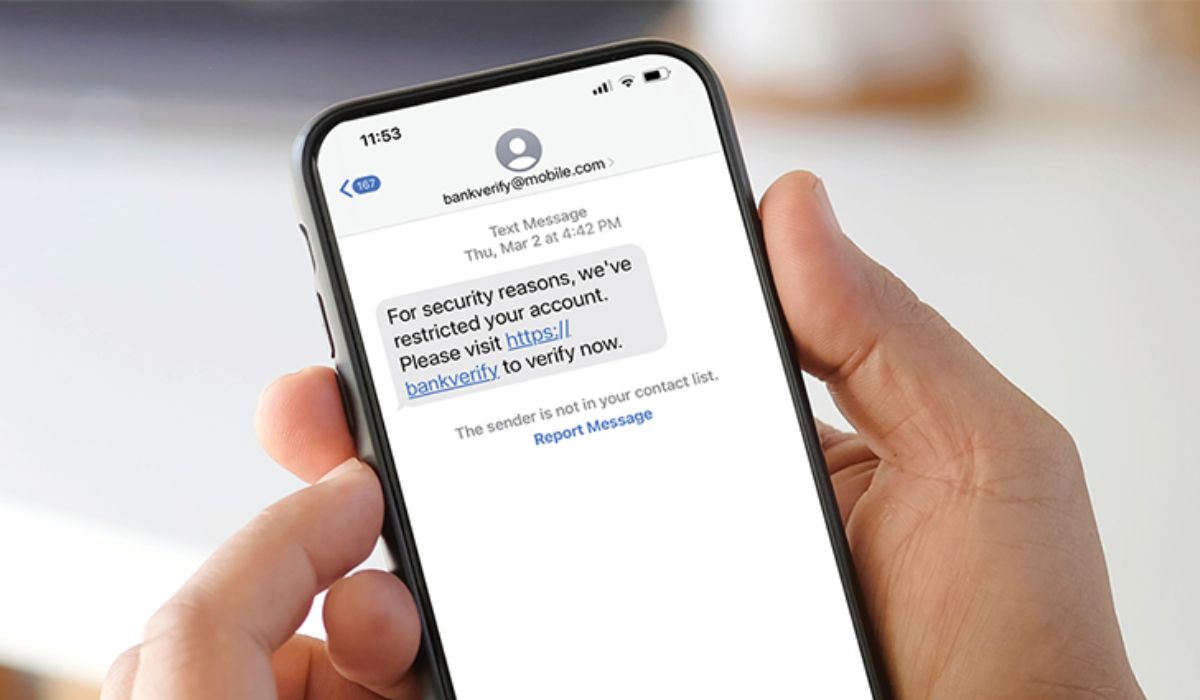
    As technology continues to advance, so do the tactics employed by cybercriminals to target unsuspecting individuals. One such method gaining popularity is “smishing,” a portmanteau of SMS (Short Message Service) and phishing. Smishing involves sending deceptive and fraudulent text messages to trick recipients into divulging sensitive information or clicking on malicious links. This article aims to educate readers on how to identify and protect themselves from smishing attacks.

    Understanding Smishing and Its Dangers

    Smishing is a form of social engineering where attackers use text messages to manipulate recipients into performing actions that compromise their security. These messages often pretend to be from reputable organizations, banks, or service providers, luring recipients with enticing offers or alarming warnings to evoke a sense of urgency.

    Watch out for Urgency and Threats

    One common trait of smishing messages is the use of urgency and threats to pressure recipients into immediate action. They may claim that your bank account is locked, a package is awaiting delivery, or your account needs verification. The urgency creates panic, leading victims to act impulsively without carefully assessing the situation.

    Examine the Sender’s Number

    Pay close attention to the sender’s phone number. Smishing messages often use phone numbers that look legitimate but might contain slight variations or unfamiliar country codes. Legitimate organizations usually have consistent contact information, so any deviation should raise suspicion.

    Be Wary of Suspicious Links

    Smishing messages often include links that lead to malicious websites designed to steal personal information or infect devices with malware. Hover over the link to preview the URL without clicking on it. If the link looks suspicious or doesn’t match the purported sender, refrain from opening it.

    Avoid Sharing Personal Information

    Legitimate companies will never request sensitive information like passwords, Social Security numbers, or credit card details via text messages. Be cautious and avoid sharing such information through texts, as it’s a clear sign of a potential smishing attempt.

    Grammatical and Spelling Errors

    Smishing messages may contain grammatical and spelling errors, as cybercriminals often operate in haste. These mistakes can serve as red flags to alert you to the message’s fraudulent nature.

    Verify with the Sender

    If you receive a message from a supposed organization or service provider, take a moment to contact them directly using their official contact information. Confirm whether the message is genuine or a smishing attempt before taking any action.

    Keep Your Devices Updated and Secure

    Maintain up-to-date antivirus software on your devices to protect against potential malware threats. Additionally, keep your operating system, apps, and security patches updated to minimize vulnerabilities that attackers might exploit.

    Smishing attacks continue to evolve, making it essential for individuals to stay vigilant and adopt proactive measures to safeguard themselves from potential threats.

    FAQs about Smishing

    1. What do smishing messages typically contain? Smishing messages often include urgent requests, offers, or warnings to trick recipients into taking immediate actions that compromise their security.

    2. How can I identify a smishing link? Hover over the link without clicking on it to preview the URL. If it appears suspicious or doesn’t match the sender’s claimed identity, it’s likely a smishing link.

    3. Should I respond to a smishing message to confront the sender? No, it’s best not to respond directly to a smishing message. Instead, verify the message’s authenticity with the supposed sender through their official contact channels.

    4. Can smishing messages contain malware? Yes, some smishing messages may include links that lead to websites infected with malware designed to compromise your device and steal sensitive information.

    5. How can I report a smishing attempt? If you receive a smishing message, you can report it to your cellular carrier and forward the message to 7726 (SPAM) to help combat such scams.

    In conclusion, In an increasingly digital world, it’s crucial to be cautious about the information we share and the messages we receive. Smishing can be a potent tool for cybercriminals to deceive and manipulate unsuspecting individuals. By understanding the common tactics used in smishing attacks and staying alert, you can significantly reduce the risk of falling victim to these scams.

  • How to Protect Yourself from Social Engineering Attacks

    How to Protect Yourself from Social Engineering Attacks

    Social engineering attacks exploit human psychology and trust to manipulate individuals into revealing sensitive information or performing actions that benefit cybercriminals. These attacks are prevalent and can have serious consequences. In this article, we will explore essential steps to protect yourself from social engineering attacks and safeguard your personal and financial information.

    Understand Social Engineering Attacks

    Being aware of what social engineering attacks are and how they work is the first step in protecting yourself. Understand that attackers use deception, manipulation, and psychological tactics to trick their victims.

    Recognize Common Social Engineering Tactics

    Familiarize yourself with common social engineering tactics, such as phishing emails, impersonation scams, baiting, and pretexting. Recognizing these tactics will help you identify potential threats.

    Be Cautious of Unsolicited Communications

    Be cautious of unsolicited phone calls, emails, or messages, especially those requesting sensitive information or immediate action. Confirm the authenticity of the sender before replying.

    Verify Identity and Information

    When in doubt, verify the identity of the person or organization reaching out to you. Use official contact information from reliable sources and avoid clicking on links in suspicious messages.

    Avoid Sharing Personal Information

    Avoid sharing personal information, such as passwords, social security numbers, or financial details, with unknown sources. Legitimate organizations won’t request sensitive information through unsolicited communications.

    Educate Yourself and Others

    Educate yourself about the latest social engineering tactics and share this knowledge with friends, family, and colleagues. Raising awareness can help others avoid falling victim to scams.

    Use Strong Authentication Methods

    Implement strong authentication methods, such as two-factor authentication (2FA) or biometrics, to add an extra layer of security to your online accounts.

    Keep Software and Devices Updated

    Regularly update your software, operating systems, and devices to patch security vulnerabilities that attackers may exploit.

    Implement Security Measures at Work

    If you handle sensitive information at work, ensure your organization has robust security measures in place to prevent social engineering attacks. Provide training to employees to identify and report suspicious activities.

    Stay Informed about the Latest Scams

    Stay informed about the latest social engineering scams by following cybersecurity news and official updates from reliable sources.

    In conclusion, Protecting yourself from social engineering attacks requires vigilance, awareness, and caution. By understanding common tactics, verifying information, and educating yourself and others, you can reduce the risk of falling victim to social engineering scams. Stay proactive in securing your personal and financial information to stay one step ahead of cybercriminals.

    FAQs (Frequently Asked Questions)

    1. Can social engineering attacks target businesses? Yes, businesses are frequent targets of social engineering attacks, especially for stealing sensitive data or gaining unauthorized access to networks.

    2. Are social engineering attacks only conducted online? While many social engineering attacks occur online, some tactics may involve physical interactions or phone calls.

    3. What should I do if I suspect a social engineering attack? If you suspect a social engineering attack, avoid interacting with the source and report the incident to relevant authorities or your organization’s IT department.

    4. Can social engineering attacks be prevented entirely? While no defense is foolproof, staying informed, and adopting security best practices significantly reduces the risk of falling victim to social engineering attacks.

    5. Is it essential to report social engineering attacks? Reporting social engineering attacks helps raise awareness and allows authorities to take action against cybercriminals, protecting others from potential harm.

  • 10 Common Social Engineering Scams

    10 Common Social Engineering Scams

    Social engineering scams are deceptive tactics used by cybercriminals to manipulate individuals into revealing sensitive information or performing certain actions. These scams rely on psychological manipulation and take advantage of human emotions and trust. In this article, we will explore ten common social engineering scams that everyone should be aware of to protect themselves from falling victim to these cunning schemes.

    1. Phishing Emails

    Phishing emails are one of the most prevalent social engineering scams. Attackers send fraudulent emails that mimic legitimate sources, such as banks or online services, to trick recipients into clicking malicious links or disclosing personal information.

    2. Fake Tech Support Calls

    In this scam, scammers impersonate tech support representatives from reputable companies and claim to detect issues with the victim’s computer or device. They convince the victim to grant remote access, enabling them to install malware or steal sensitive data.

    3. Impersonation Scams

    Social engineers may impersonate someone the victim knows or trusts, such as a colleague, friend, or family member, to gain access to personal information or funds.

    4. Baiting and Tailgating

    Baiting involves enticing victims with free downloads or tempting offers that contain malware. Tailgating occurs when an attacker gains unauthorized physical access to a secure location by following an authorized person.

    5. Pretexting

    In pretexting scams, the attacker fabricates a convincing scenario to obtain personal information from the victim, often pretending to be a coworker, customer service representative, or authority figure.

    6. Quizzes and Surveys Scams

    On social media or seemingly harmless websites, scammers may entice users with quizzes or surveys that prompt them to provide personal details unknowingly.

    7. Romance Scams

    Scammers build fake online relationships with victims, gaining their trust and eventually requesting money or sensitive information.

    8. Lottery and Prize Scams

    Victims receive messages claiming they have won a lottery or prize, but they need to pay fees or provide personal information to claim the reward. In reality, there is no prize, and the scammers exploit the victim’s excitement.

    9. Charity Scams

    In charity scams, criminals pose as representatives of reputable organizations, capitalizing on the victim’s desire to help others. They request donations but use the funds for personal gain.

    10. Social Media Impersonation and Hacking

    Scammers create fake profiles impersonating real individuals, including friends or family members, to gain access to personal information or deceive others into financial transactions.

    In conclusion, Being aware of common social engineering scams is crucial in protecting ourselves and our sensitive information from cybercriminals. By staying vigilant, educating ourselves, and questioning suspicious communications, we can fortify our defenses against social engineering attacks. Remember, if something seems too good to be true or feels off, it’s essential to verify before taking any action.

    FAQs (Frequently Asked Questions)

    1. Are social engineering scams only conducted online? While many social engineering scams occur online, some may also involve physical interactions or phone calls.

    2. Can businesses be targets of social engineering scams? Yes, businesses are frequent targets of social engineering, especially for obtaining sensitive company information or compromising networks.

    3. How can I protect myself from social engineering scams? Be cautious of unsolicited communications, verify the identity of the sender, and avoid sharing personal or financial information with unknown sources.

    4. What should I do if I suspect a social engineering scam? If you suspect a scam, refrain from providing any information or clicking on links. Report the incident to the relevant authorities or the organization the scammer is impersonating.

    5. Is there any way to recover funds lost to social engineering scams? It’s challenging to recover funds lost to social engineering scams, making prevention and awareness crucial to avoid falling victim.

  • Steps to Take if You Think You’ve Been Scammed

    Steps to Take if You Think You’ve Been Scammed

    Getting scammed can be a distressing experience, leaving victims feeling vulnerable and frustrated. Scammers use various tactics to deceive people and steal their money or sensitive information. If you suspect you have fallen victim to a scam, it’s crucial to act swiftly and responsibly. This article outlines essential steps to take if you think you’ve been scammed, helping you regain control of the situation and protect yourself from further harm.

    Recognizing the Signs of a Scam

    Scammers employ a wide array of tactics, such as phishing emails, fake websites, phone calls, or social engineering, to trick their targets. Being able to recognize the signs of a scam is the first step in preventing further damage. Common signs include unsolicited requests for personal information, urgent demands for payment, and offers that sound too good to be true.

    Immediate Steps to Take

    1. Pause and Verify: If you receive a suspicious message or call, take a moment to pause and verify the legitimacy of the request. Avoid acting impulsively and giving out sensitive information.
    2. Secure Your Accounts: If the scam involves compromising your online accounts, change your passwords immediately to prevent further unauthorized access.
    3. Disconnect and Report: If you suspect a scam during a phone call, hang up immediately. Block the number and report it to your phone carrier or relevant authorities.

    Contacting the Relevant Authorities

    1. Local Law Enforcement: Contact your local police or law enforcement agency to report the scam. Offer as many details as possible to assist with their investigation.
    2. Federal Trade Commission (FTC): If the scam involves identity theft or fraudulent practices, file a complaint with the FTC through their website.
    3. Internet Crime Complaint Center (IC3): For online scams, file a complaint with the IC3, a partnership between the FBI and the National White Collar Crime Center.

    Reporting the Scam

    Report the scam to relevant consumer protection agencies, such as your country’s consumer affairs department or consumer protection agency. Reporting scams helps authorities track and prevent future incidents.

    Preventative Measures

    1. Educate Yourself: Stay informed about common scam tactics and educate yourself about the latest scam trends to protect yourself better.
    2. Be Cautious Online: Exercise caution when interacting with unfamiliar websites or links, especially those requesting personal information or payments.
    3. Use Security Software: Install reputable antivirus and anti-malware software to protect your devices from potential threats.

    Seeking Professional Assistance

    If you suspect that your financial or personal information has been compromised, consider seeking assistance from professionals, such as identity theft protection services or legal advisors.

    Educating Others

    Spread awareness about scams to friends, family, and colleagues. Informing others about potential scams helps create a more vigilant community and reduces the likelihood of successful scams.

    In conclusion, Being scammed can be a disheartening experience, but taking immediate action can mitigate the damage and protect others from falling victim. By recognizing the signs, reporting the scam, and seeking professional assistance if necessary, you can regain control and prevent future scams. Remember, staying informed and educating others are powerful tools in the fight against scams.

    FAQs (Frequently Asked Questions)

    1. Can I get my money back after being scammed? In some cases, victims may be able to recover their money, especially if they act promptly and report the scam to the relevant authorities.

    2. How can I protect myself from future scams? Educate yourself about common scam tactics, be cautious online, and avoid sharing personal information with unknown entities.

    3. Should I inform my bank if I’ve been scammed? Yes, contacting your bank or financial institution is essential to protect your accounts and block any unauthorized transactions.

    4. Can I trust emails or calls from unknown numbers claiming to be from my bank or government agencies? Be cautious with unsolicited communications, especially if they request personal information or urgent action. Always verify their legitimacy with official contacts.

    5. Are there any resources for reporting scams globally? Yes, you can report scams to organizations like the International Consumer Protection and Enforcement Network (ICPEN) for global assistance and cooperation against scams.

  • How to Back Up Your Data Securely

    How to Back Up Your Data Securely

    Data is one of our most valuable assets, and ensuring its safety is paramount in today’s digital world. Backing up your data securely is essential to protect it from potential loss due to hardware failures, malware attacks, or accidental deletion. This article provides a step-by-step guide on how to back up your data securely to safeguard your precious files and information.

    1. Choose the Right Storage Medium

    Select a reliable and secure storage medium for your backups. Options include:

    • External Hard Drives: These offer ample storage space and can be disconnected from your system after backup, reducing the risk of malware attacks.
    • Cloud Storage Services: Cloud services provide remote backup with encryption and accessibility from anywhere with an internet connection.
    • Network Attached Storage (NAS): NAS devices enable backups across multiple devices on a local network, offering convenient centralized storage.

    2. Use Encryption

    Whether you choose an external drive or a cloud service, ensure your backups are encrypted. Through encryption, your data undergoes scrambling, rendering it indecipherable without the proper decryption key. Most reputable backup solutions offer built-in encryption features.

    3. Schedule Regular Backups

    Set up a regular backup schedule to ensure your data is always up to date. Automated backups prevent data loss due to forgetfulness or procrastination.

    4. Follow the 3-2-1 Rule

    Adhere to the 3-2-1 rule: Have at least three copies of your data, store them on two different types of media, and keep one copy offsite. This redundancy strategy adds an extra layer of security.

    5. Test Your Backups

    Periodically test your backups to ensure they are functioning correctly and can be restored without issues. This practice ensures your data is recoverable in case of emergencies.

    6. Use Strong Passwords

    Secure your backup devices or accounts with strong passwords. Steer clear of common passwords and create unique combinations with a mix of uppercase and lowercase letters, numbers, and special characters.

    7. Enable Two-Factor Authentication (2FA)

    Where possible, enable 2FA for your cloud storage or backup services. 2FA adds an extra layer of protection by requiring an additional verification method, such as a one-time code sent to your mobile device.

    8. Keep Your Backup Software Updated

    Regularly update your backup software to benefit from the latest security enhancements and bug fixes.

    9. Separate Work and Personal Backups

    If applicable, keep your work and personal backups separate to ensure privacy and security of sensitive information.

    10. Secure Physical Storage

    If you use external hard drives for backup, store them in a safe and secure location, away from potential physical threats such as fire or theft.

    11. Monitor and Manage Access

    Control access to your backups and limit permissions only to trusted individuals or accounts. By doing this, you decrease the risk of unauthorized access.

    12. Consider Offsite Backups

    In addition to local backups, consider offsite backups. Storing data in a different physical location protects against site-specific disasters.

    In conclusion, Backing up your data securely is a critical practice in safeguarding your information from potential loss or cyber threats. By following the steps outlined in this guide, you can ensure the safety and availability of your data, providing peace of mind and protection for your digital assets.

    FAQs (Frequently Asked Questions)

    1. Why should I back up my data? Backing up your data is crucial to protect it from potential loss due to hardware failures, malware attacks, accidental deletion, or other unforeseen events.
    2. How often should I back up my data? The frequency of data backups depends on how often your data changes. Consider daily or weekly backups for critical data.
    3. Can I use a USB flash drive for backups? Yes, you can use a USB flash drive for backups, but it’s essential to ensure its capacity is sufficient for your data, and you store it securely.
    4. Should I rely only on cloud backups? While cloud backups offer convenience and accessibility, it’s advisable to have additional local backups for added redundancy.
    5. How long should I keep my backups? Keep multiple versions of your backups to enable restoration to a specific point in time. For important files, retain backups for a few months or longer.
  • The Importance of Security Patches

    The Importance of Security Patches

    In today’s interconnected digital landscape, where cyber threats are constantly evolving, the significance of security patches cannot be overstated. Security patches play a critical role in fortifying our devices and software against potential vulnerabilities that could be exploited by malicious actors. This article explores why security patches are essential for maintaining robust cybersecurity and safeguarding our sensitive data and digital assets.

    What are Security Patches?

    Security patches are updates or fixes released by software developers and device manufacturers to address identified security flaws and vulnerabilities in their products. These flaws may have been discovered either through internal testing or reported by cybersecurity researchers and ethical hackers. Patches are designed to plug these security holes, ensuring that users’ systems and data remain protected from potential attacks.

    The Ever-Present Cybersecurity Threat Landscape

    The digital world is rife with cybersecurity threats, ranging from malware and ransomware attacks to data breaches and phishing attempts. Cybercriminals continually seek out vulnerabilities in software and operating systems to gain unauthorized access, steal sensitive information, and disrupt critical systems. With technology becoming an integral part of our personal and professional lives, the consequences of successful cyberattacks can be severe, leading to financial loss, reputational damage, and privacy breaches.

    Addressing Vulnerabilities through Security Patches

    Security patches are a proactive measure taken by developers and manufacturers to stay one step ahead of cyber threats. They serve the following crucial purposes:

    1. Closing Security Gaps: Security patches help close security gaps that hackers could exploit to gain unauthorized access to devices or networks.
    2. Preventing Data Breaches: By fixing vulnerabilities, patches reduce the risk of data breaches, keeping sensitive information out of the hands of cybercriminals.
    3. Protecting Personal Privacy: Patches help protect users’ personal privacy by thwarting potential attempts to access private data without authorization.
    4. Maintaining Software Integrity: Regular patching ensures that software functions as intended, minimizing unexpected errors or crashes.

    The Impact of Delayed or Ignored Patches

    Delaying or ignoring security patches can have severe consequences:

    1. Increased Vulnerability: Devices and systems without the latest patches remain vulnerable to known exploits and attacks.
    2. Exposure to Zero-Day Attacks: Zero-day vulnerabilities are flaws that have not yet been patched, and delaying updates makes devices susceptible to such attacks.
    3. Compromised Network Security: An unpatched device can become a point of entry for cyber attackers to infiltrate an entire network.
    4. Legal and Regulatory Consequences: In some industries, failure to apply security patches may lead to non-compliance with industry regulations and legal standards.

    Best Practices for Patch Management

    To maximize the benefits of security patches, consider the following best practices:

    1. Enable Automatic Updates: Enable automatic updates for operating systems and software to ensure timely application of patches.
    2. Stay Informed: Keep abreast of security news and vendor announcements to be aware of recent vulnerabilities and patches.
    3. Patch All Devices: Don’t forget to patch all devices, including smartphones, tablets, routers, and Internet of Things (IoT) devices.
    4. Test Before Deployment: For enterprise environments, test patches on a limited scale before deploying them across the entire network.

    In conclusion, Security patches are crucial components of a robust cybersecurity strategy. By promptly applying patches, users and organizations can fortify their defenses against emerging threats and stay resilient in the face of an ever-changing cybersecurity landscape. Regular patching not only protects sensitive data and privacy but also contributes to the overall health and integrity of digital systems.

    FAQs (Frequently Asked Questions)

    1. Why are security patches important? Security patches are crucial because they fix known vulnerabilities in software and operating systems. Applying patches promptly helps protect devices and data from potential cyber threats.
    2. How often should I apply security patches? It’s recommended to apply security patches as soon as they become available. Many software and operating systems offer automatic update options for seamless and timely patching.
    3. Can I ignore security patches if my device seems to be working fine? Ignoring security patches can leave your device vulnerable to cyberattacks, even if it appears to be functioning correctly. Hackers may exploit unpatched vulnerabilities.
    4. Do security patches slow down my device? Security patches are designed to enhance the security of your device and should not significantly affect its performance. In some cases, patching may even improve performance by addressing bugs.
    5. What should I do if a security patch causes issues on my device? In rare cases, a security patch may cause compatibility issues. In such situations, contact the software or device manufacturer for support or seek guidance from their official forums.
  • The Best Malware Removal Tools

    The Best Malware Removal Tools

    Malware poses a significant threat to our digital lives, compromising the security and integrity of our devices and personal information. The best way to combat malware is by using reliable and effective malware removal tools. This article will explore the top 5 malware removal tools known for their efficiency in detecting and eliminating various types of malware.

    What is Malware?

    Malware refers to malicious software designed to infiltrate and damage computers, networks, and devices. It includes viruses, worms, Trojans, spyware, adware, ransomware, and other harmful programs.

    Importance of Malware Removal Tools

    Malware removal tools are essential for several reasons:

    1. Detecting and Removing Malicious Software: These tools can identify and eliminate malware from your system, preventing further damage.
    2. Protecting Personal Data: By removing malware, these tools safeguard your sensitive data from theft and unauthorized access.
    3. Enhancing Device Performance: Eliminating malware can improve your device’s performance and speed.

    Criteria for Selecting the Best Malware Removal Tools

    When choosing the best malware removal tools, consider the following factors:

    1. Malware Detection Rate: Look for tools with high malware detection rates to ensure comprehensive protection.
    2. Real-Time Protection: Real-time scanning and monitoring help prevent malware from infecting your system in the first place.
    3. Removal Effectiveness: The tool should be able to effectively remove malware without causing damage to your files or system.
    4. User-Friendly Interface: An intuitive interface makes the tool accessible to users of all levels of expertise.

    Top 5 Malware Removal Tools

    Let’s explore the top 5 malware removal tools known for their effectiveness and reliability:

    1. Malwarebytes

    Malwarebytes is a popular malware removal tool that is known for its effectiveness. It can detect and remove a wide variety of malware, including viruses, trojans, ransomware, and adware. Malwarebytes is also easy to use, even for beginners.

    2. Avast Antivirus

    Avast Antivirus is a comprehensive antivirus solution that includes a malware removal tool. Avast Antivirus is very effective at detecting and removing malware, and it also offers a variety of other features, such as a firewall and a VPN.

    3. AVG Antivirus

    AVG Antivirus is another comprehensive antivirus solution that includes a malware removal tool. AVG Antivirus is very effective at detecting and removing malware, and it also offers a variety of other features, such as a firewall and a password manager.

    4. Bitdefender

    Bitdefender is a powerful malware removal tool that is known for its ability to detect and remove even the most sophisticated malware. Bitdefender is also very user-friendly, and it offers a variety of features, such as a real-time protection shield and a file shredder.

    5. Norton AntiVirus

    Norton AntiVirus is a well-respected antivirus solution that includes a malware removal tool. Norton AntiVirus is very effective at detecting and removing malware, and it also offers a variety of other features, such as a firewall and a parental control suite.

    In conclusion, Protecting your digital devices from malware is crucial in maintaining the security and privacy of your online activities. The top 5 malware removal tools mentioned in this article offer effective solutions to combat various types of malware. Choose the one that best suits your needs, and keep your system safe from harmful threats.

    FAQs (Frequently Asked Questions)

    1. Can free malware removal tools be trusted? Some free tools are reliable, but paid versions often offer more comprehensive protection and additional features.
    2. How often should I scan for malware? Regular scans are essential for proactive protection. Perform scans at least once a week or more frequently if you browse the internet extensively.
    3. Can malware removal tools prevent all types of malware? While malware removal tools are effective, staying cautious online and avoiding suspicious links and downloads is equally important.
    4. What should I do if a malware removal tool detects threats? Follow the tool’s instructions to remove or quarantine the detected threats for further analysis and elimination.
    5. Do malware removal tools impact system performance? Most modern malware removal tools are designed to have minimal impact on system performance, especially during real-time scanning.
  • The Best VPNs for Privacy and Security

    The Best VPNs for Privacy and Security

    A VPN is a service that establishes a secure and encrypted connection between your device and the internet by routing your internet traffic through a remote server. It hides your real IP address and encrypts your data, making it challenging for hackers, ISPs, and even governments to monitor your online activities.

    In an age where digital privacy is at risk and cyber threats are on the rise, using a Virtual Private Network (VPN) has become essential for safeguarding our online activities. A VPN can protect your internet connection, encrypt your data, and ensure your anonymity while browsing the web. This article explores the top 5 VPNs known for their commitment to privacy and security, enabling you to make an informed choice for your digital protection.

    Importance of VPNs for Privacy and Security

    Using a VPN offers several benefits for privacy and security:

    1. Data Encryption: VPNs encrypt your internet traffic, ensuring that your sensitive data remains secure from potential eavesdroppers.
    2. Anonymous Browsing: By masking your IP address, VPNs provide anonymous browsing, preventing websites from tracking your online behavior.
    3. Bypassing Geo-Restrictions: VPNs allow you to access geo-restricted content and services by connecting to servers in different countries.

    Criteria for Selecting the Best VPNs

    When choosing the best VPN for privacy and security, consider the following factors:

    1. Strong Encryption: Look for VPNs that use AES-256 encryption or higher to safeguard your data.
    2. No-Log Policy: Choose VPNs that have a strict no-log policy, ensuring they don’t keep records of your online activities.
    3. Server Locations: VPNs with a wide range of server locations offer more options for accessing content and improving connection speeds.
    4. Kill Switch: A kill switch feature automatically disconnects your internet if the VPN connection drops, preventing any data leaks.
    5. User-Friendly Interface: An intuitive and user-friendly interface enhances the overall VPN experience.

    Top 5 VPNs for Privacy and Security

    Let’s explore the top 5 VPNs that prioritize your privacy and security:

    1. NordVPN

    NordVPN stands as a highly acclaimed VPN in the market, known for its extensive feature set. It includes military-grade encryption, a strict no-logs policy, and a kill switch for enhanced security. NordVPN is also one of the fastest VPNs available, making it a good choice for streaming and gaming.

    2. Surfshark

    Surfshark is a newer VPN that is quickly gaining popularity. It offers many of the same features as NordVPN, but it is also more affordable. Surfshark also allows you to connect an unlimited number of devices to the VPN at the same time, which is great for families or businesses.

    3. ExpressVPN

    ExpressVPN ranks among the leading VPN providers, renowned for its remarkable speed capabilities. It offers a wide range of features, including split tunneling, DNS leak protection, and a kill switch. ExpressVPN is also one of the most user-friendly VPNs available, making it a good choice for beginners.

    4. ProtonVPN

    ProtonVPN is a VPN that is known for its focus on privacy. It is based in Switzerland, which has strict privacy laws. ProtonVPN offers a wide range of features, including open-source code, secure core servers, and Tor over VPN.

    5. Mullvad

    Mullvad is a VPN that is known for its privacy and anonymity. It does not require any personal information to sign up, and it accepts payments in cash. Mullvad offers a wide range of features, including a strict no-logs policy, anonymous payments, and obfuscated servers.

    In conclusion, Using a reliable VPN is a crucial step in safeguarding your privacy and enhancing your online security. The top 5 VPNs mentioned in this article offer robust encryption, no-log policies, and various other features to ensure your digital safety. Choose the one that best suits your needs and browse the web with confidence, knowing your privacy is protected.

    FAQs (Frequently Asked Questions)

    1. Are VPNs legal to use? Yes, VPNs are legal in most countries. However, ensure you use them for legitimate purposes and avoid any illegal activities.
    2. Can VPNs slow down my internet speed? VPNs may slightly reduce your internet speed due to encryption and routing, but reputable VPNs usually offer good performance.
    3. Can VPNs protect me from all online threats? While VPNs enhance your security, they are not a replacement for other security measures like antivirus software and common sense online practices.
    4. Do all VPNs work with streaming services? Not all VPNs can bypass the geo-restrictions imposed by streaming services. Choose a VPN known for unblocking content if that’s your priority.
    5. Can I use a VPN on multiple devices? Many VPN providers offer multi-device support, allowing you to use the VPN on various devices simultaneously.