Category: Social Engineering

  • How to Spot a Smishing Text Message

    How to Spot a Smishing Text Message

    As technology continues to advance, so do the tactics employed by cybercriminals to target unsuspecting individuals. One such method gaining popularity is “smishing,” a portmanteau of SMS (Short Message Service) and phishing. Smishing involves sending deceptive and fraudulent text messages to trick recipients into divulging sensitive information or clicking on malicious links. This article aims to educate readers on how to identify and protect themselves from smishing attacks.

    Understanding Smishing and Its Dangers

    Smishing is a form of social engineering where attackers use text messages to manipulate recipients into performing actions that compromise their security. These messages often pretend to be from reputable organizations, banks, or service providers, luring recipients with enticing offers or alarming warnings to evoke a sense of urgency.

    Watch out for Urgency and Threats

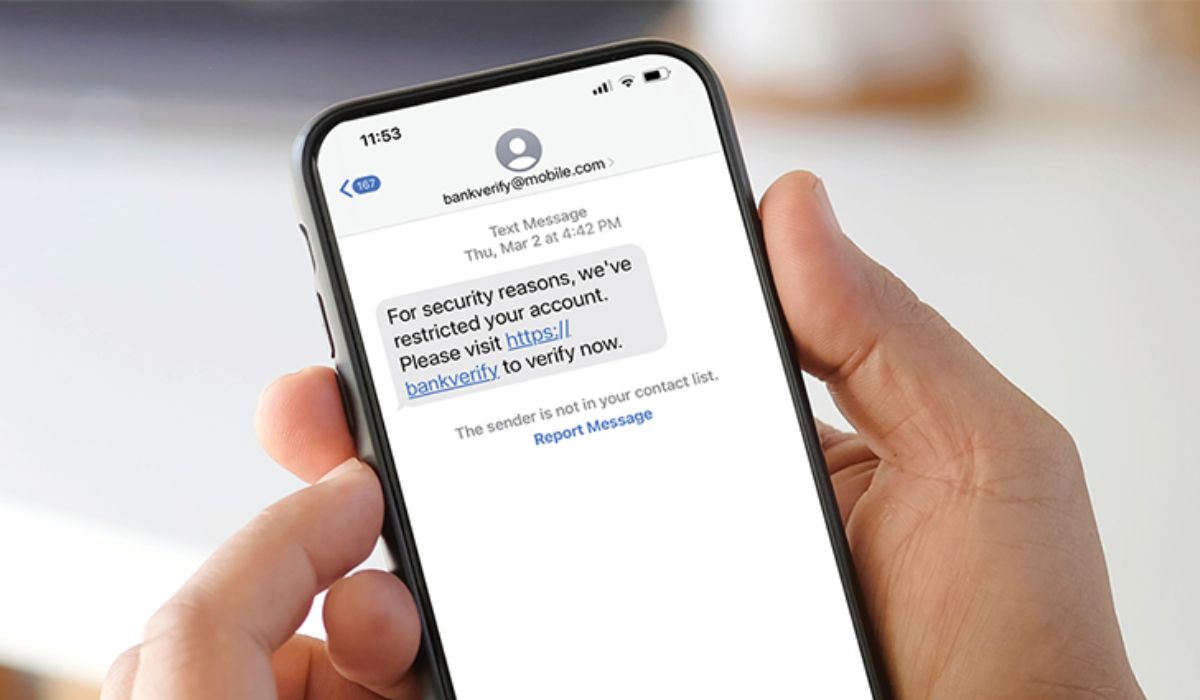
    One common trait of smishing messages is the use of urgency and threats to pressure recipients into immediate action. They may claim that your bank account is locked, a package is awaiting delivery, or your account needs verification. The urgency creates panic, leading victims to act impulsively without carefully assessing the situation.

    Examine the Sender’s Number

    Pay close attention to the sender’s phone number. Smishing messages often use phone numbers that look legitimate but might contain slight variations or unfamiliar country codes. Legitimate organizations usually have consistent contact information, so any deviation should raise suspicion.

    Be Wary of Suspicious Links

    Smishing messages often include links that lead to malicious websites designed to steal personal information or infect devices with malware. Hover over the link to preview the URL without clicking on it. If the link looks suspicious or doesn’t match the purported sender, refrain from opening it.

    Avoid Sharing Personal Information

    Legitimate companies will never request sensitive information like passwords, Social Security numbers, or credit card details via text messages. Be cautious and avoid sharing such information through texts, as it’s a clear sign of a potential smishing attempt.

    Grammatical and Spelling Errors

    Smishing messages may contain grammatical and spelling errors, as cybercriminals often operate in haste. These mistakes can serve as red flags to alert you to the message’s fraudulent nature.

    Verify with the Sender

    If you receive a message from a supposed organization or service provider, take a moment to contact them directly using their official contact information. Confirm whether the message is genuine or a smishing attempt before taking any action.

    Keep Your Devices Updated and Secure

    Maintain up-to-date antivirus software on your devices to protect against potential malware threats. Additionally, keep your operating system, apps, and security patches updated to minimize vulnerabilities that attackers might exploit.

    Smishing attacks continue to evolve, making it essential for individuals to stay vigilant and adopt proactive measures to safeguard themselves from potential threats.

    FAQs about Smishing

    1. What do smishing messages typically contain? Smishing messages often include urgent requests, offers, or warnings to trick recipients into taking immediate actions that compromise their security.

    2. How can I identify a smishing link? Hover over the link without clicking on it to preview the URL. If it appears suspicious or doesn’t match the sender’s claimed identity, it’s likely a smishing link.

    3. Should I respond to a smishing message to confront the sender? No, it’s best not to respond directly to a smishing message. Instead, verify the message’s authenticity with the supposed sender through their official contact channels.

    4. Can smishing messages contain malware? Yes, some smishing messages may include links that lead to websites infected with malware designed to compromise your device and steal sensitive information.

    5. How can I report a smishing attempt? If you receive a smishing message, you can report it to your cellular carrier and forward the message to 7726 (SPAM) to help combat such scams.

    In conclusion, In an increasingly digital world, it’s crucial to be cautious about the information we share and the messages we receive. Smishing can be a potent tool for cybercriminals to deceive and manipulate unsuspecting individuals. By understanding the common tactics used in smishing attacks and staying alert, you can significantly reduce the risk of falling victim to these scams.

  • How to Protect Yourself from Social Engineering Attacks

    How to Protect Yourself from Social Engineering Attacks

    Social engineering attacks exploit human psychology and trust to manipulate individuals into revealing sensitive information or performing actions that benefit cybercriminals. These attacks are prevalent and can have serious consequences. In this article, we will explore essential steps to protect yourself from social engineering attacks and safeguard your personal and financial information.

    Understand Social Engineering Attacks

    Being aware of what social engineering attacks are and how they work is the first step in protecting yourself. Understand that attackers use deception, manipulation, and psychological tactics to trick their victims.

    Recognize Common Social Engineering Tactics

    Familiarize yourself with common social engineering tactics, such as phishing emails, impersonation scams, baiting, and pretexting. Recognizing these tactics will help you identify potential threats.

    Be Cautious of Unsolicited Communications

    Be cautious of unsolicited phone calls, emails, or messages, especially those requesting sensitive information or immediate action. Confirm the authenticity of the sender before replying.

    Verify Identity and Information

    When in doubt, verify the identity of the person or organization reaching out to you. Use official contact information from reliable sources and avoid clicking on links in suspicious messages.

    Avoid Sharing Personal Information

    Avoid sharing personal information, such as passwords, social security numbers, or financial details, with unknown sources. Legitimate organizations won’t request sensitive information through unsolicited communications.

    Educate Yourself and Others

    Educate yourself about the latest social engineering tactics and share this knowledge with friends, family, and colleagues. Raising awareness can help others avoid falling victim to scams.

    Use Strong Authentication Methods

    Implement strong authentication methods, such as two-factor authentication (2FA) or biometrics, to add an extra layer of security to your online accounts.

    Keep Software and Devices Updated

    Regularly update your software, operating systems, and devices to patch security vulnerabilities that attackers may exploit.

    Implement Security Measures at Work

    If you handle sensitive information at work, ensure your organization has robust security measures in place to prevent social engineering attacks. Provide training to employees to identify and report suspicious activities.

    Stay Informed about the Latest Scams

    Stay informed about the latest social engineering scams by following cybersecurity news and official updates from reliable sources.

    In conclusion, Protecting yourself from social engineering attacks requires vigilance, awareness, and caution. By understanding common tactics, verifying information, and educating yourself and others, you can reduce the risk of falling victim to social engineering scams. Stay proactive in securing your personal and financial information to stay one step ahead of cybercriminals.

    FAQs (Frequently Asked Questions)

    1. Can social engineering attacks target businesses? Yes, businesses are frequent targets of social engineering attacks, especially for stealing sensitive data or gaining unauthorized access to networks.

    2. Are social engineering attacks only conducted online? While many social engineering attacks occur online, some tactics may involve physical interactions or phone calls.

    3. What should I do if I suspect a social engineering attack? If you suspect a social engineering attack, avoid interacting with the source and report the incident to relevant authorities or your organization’s IT department.

    4. Can social engineering attacks be prevented entirely? While no defense is foolproof, staying informed, and adopting security best practices significantly reduces the risk of falling victim to social engineering attacks.

    5. Is it essential to report social engineering attacks? Reporting social engineering attacks helps raise awareness and allows authorities to take action against cybercriminals, protecting others from potential harm.

  • 10 Common Social Engineering Scams

    10 Common Social Engineering Scams

    Social engineering scams are deceptive tactics used by cybercriminals to manipulate individuals into revealing sensitive information or performing certain actions. These scams rely on psychological manipulation and take advantage of human emotions and trust. In this article, we will explore ten common social engineering scams that everyone should be aware of to protect themselves from falling victim to these cunning schemes.

    1. Phishing Emails

    Phishing emails are one of the most prevalent social engineering scams. Attackers send fraudulent emails that mimic legitimate sources, such as banks or online services, to trick recipients into clicking malicious links or disclosing personal information.

    2. Fake Tech Support Calls

    In this scam, scammers impersonate tech support representatives from reputable companies and claim to detect issues with the victim’s computer or device. They convince the victim to grant remote access, enabling them to install malware or steal sensitive data.

    3. Impersonation Scams

    Social engineers may impersonate someone the victim knows or trusts, such as a colleague, friend, or family member, to gain access to personal information or funds.

    4. Baiting and Tailgating

    Baiting involves enticing victims with free downloads or tempting offers that contain malware. Tailgating occurs when an attacker gains unauthorized physical access to a secure location by following an authorized person.

    5. Pretexting

    In pretexting scams, the attacker fabricates a convincing scenario to obtain personal information from the victim, often pretending to be a coworker, customer service representative, or authority figure.

    6. Quizzes and Surveys Scams

    On social media or seemingly harmless websites, scammers may entice users with quizzes or surveys that prompt them to provide personal details unknowingly.

    7. Romance Scams

    Scammers build fake online relationships with victims, gaining their trust and eventually requesting money or sensitive information.

    8. Lottery and Prize Scams

    Victims receive messages claiming they have won a lottery or prize, but they need to pay fees or provide personal information to claim the reward. In reality, there is no prize, and the scammers exploit the victim’s excitement.

    9. Charity Scams

    In charity scams, criminals pose as representatives of reputable organizations, capitalizing on the victim’s desire to help others. They request donations but use the funds for personal gain.

    10. Social Media Impersonation and Hacking

    Scammers create fake profiles impersonating real individuals, including friends or family members, to gain access to personal information or deceive others into financial transactions.

    In conclusion, Being aware of common social engineering scams is crucial in protecting ourselves and our sensitive information from cybercriminals. By staying vigilant, educating ourselves, and questioning suspicious communications, we can fortify our defenses against social engineering attacks. Remember, if something seems too good to be true or feels off, it’s essential to verify before taking any action.

    FAQs (Frequently Asked Questions)

    1. Are social engineering scams only conducted online? While many social engineering scams occur online, some may also involve physical interactions or phone calls.

    2. Can businesses be targets of social engineering scams? Yes, businesses are frequent targets of social engineering, especially for obtaining sensitive company information or compromising networks.

    3. How can I protect myself from social engineering scams? Be cautious of unsolicited communications, verify the identity of the sender, and avoid sharing personal or financial information with unknown sources.

    4. What should I do if I suspect a social engineering scam? If you suspect a scam, refrain from providing any information or clicking on links. Report the incident to the relevant authorities or the organization the scammer is impersonating.

    5. Is there any way to recover funds lost to social engineering scams? It’s challenging to recover funds lost to social engineering scams, making prevention and awareness crucial to avoid falling victim.

  • Steps to Take if You Think You’ve Been Scammed

    Steps to Take if You Think You’ve Been Scammed

    Getting scammed can be a distressing experience, leaving victims feeling vulnerable and frustrated. Scammers use various tactics to deceive people and steal their money or sensitive information. If you suspect you have fallen victim to a scam, it’s crucial to act swiftly and responsibly. This article outlines essential steps to take if you think you’ve been scammed, helping you regain control of the situation and protect yourself from further harm.

    Recognizing the Signs of a Scam

    Scammers employ a wide array of tactics, such as phishing emails, fake websites, phone calls, or social engineering, to trick their targets. Being able to recognize the signs of a scam is the first step in preventing further damage. Common signs include unsolicited requests for personal information, urgent demands for payment, and offers that sound too good to be true.

    Immediate Steps to Take

    1. Pause and Verify: If you receive a suspicious message or call, take a moment to pause and verify the legitimacy of the request. Avoid acting impulsively and giving out sensitive information.
    2. Secure Your Accounts: If the scam involves compromising your online accounts, change your passwords immediately to prevent further unauthorized access.
    3. Disconnect and Report: If you suspect a scam during a phone call, hang up immediately. Block the number and report it to your phone carrier or relevant authorities.

    Contacting the Relevant Authorities

    1. Local Law Enforcement: Contact your local police or law enforcement agency to report the scam. Offer as many details as possible to assist with their investigation.
    2. Federal Trade Commission (FTC): If the scam involves identity theft or fraudulent practices, file a complaint with the FTC through their website.
    3. Internet Crime Complaint Center (IC3): For online scams, file a complaint with the IC3, a partnership between the FBI and the National White Collar Crime Center.

    Reporting the Scam

    Report the scam to relevant consumer protection agencies, such as your country’s consumer affairs department or consumer protection agency. Reporting scams helps authorities track and prevent future incidents.

    Preventative Measures

    1. Educate Yourself: Stay informed about common scam tactics and educate yourself about the latest scam trends to protect yourself better.
    2. Be Cautious Online: Exercise caution when interacting with unfamiliar websites or links, especially those requesting personal information or payments.
    3. Use Security Software: Install reputable antivirus and anti-malware software to protect your devices from potential threats.

    Seeking Professional Assistance

    If you suspect that your financial or personal information has been compromised, consider seeking assistance from professionals, such as identity theft protection services or legal advisors.

    Educating Others

    Spread awareness about scams to friends, family, and colleagues. Informing others about potential scams helps create a more vigilant community and reduces the likelihood of successful scams.

    In conclusion, Being scammed can be a disheartening experience, but taking immediate action can mitigate the damage and protect others from falling victim. By recognizing the signs, reporting the scam, and seeking professional assistance if necessary, you can regain control and prevent future scams. Remember, staying informed and educating others are powerful tools in the fight against scams.

    FAQs (Frequently Asked Questions)

    1. Can I get my money back after being scammed? In some cases, victims may be able to recover their money, especially if they act promptly and report the scam to the relevant authorities.

    2. How can I protect myself from future scams? Educate yourself about common scam tactics, be cautious online, and avoid sharing personal information with unknown entities.

    3. Should I inform my bank if I’ve been scammed? Yes, contacting your bank or financial institution is essential to protect your accounts and block any unauthorized transactions.

    4. Can I trust emails or calls from unknown numbers claiming to be from my bank or government agencies? Be cautious with unsolicited communications, especially if they request personal information or urgent action. Always verify their legitimacy with official contacts.

    5. Are there any resources for reporting scams globally? Yes, you can report scams to organizations like the International Consumer Protection and Enforcement Network (ICPEN) for global assistance and cooperation against scams.

  • Protecting Kids from Phishing Scams

    Protecting Kids from Phishing Scams

    In today’s digital age, children are exposed to the internet from an early age, making them susceptible to various online threats, including phishing scams. As parents and caregivers, it’s essential to take proactive measures to protect kids from falling victim to phishing scams. This article provides valuable tips to safeguard children from these deceptive online tactics and ensure their online safety.

    Educate Kids about Phishing Scams

    Begin by educating children about what phishing scams are and how cybercriminals use them to deceive people. Explain that not everyone online can be trusted and that they need to be cautious when interacting with unfamiliar sources.

    Teach them to Recognize Suspicious Emails

    Train kids to identify suspicious emails that may contain spelling errors, strange sender addresses, or requests for personal information. Encourage them to report such emails to a trusted adult.

    Instruct them to Avoid Clicking on Links

    Advise children not to click on links in emails or messages from unknown senders, as these links could lead to malicious websites or scams.

    Advise Against Sharing Personal Information

    Teach kids to keep their personal information, such as full names, addresses, and phone numbers, private and not share them with strangers online.

    Encourage Two-Factor Authentication

    Explain the importance of using two-factor authentication (2FA) for additional security on their online accounts. 2FA requires an extra verification step, making it harder for scammers to access accounts.

    Set Parental Controls on Devices

    Use parental control features on devices and apps to limit access to age-appropriate content and protect children from potential phishing attempts.

    Use Child-Friendly Browsers and Apps

    Choose child-friendly browsers and apps that have built-in safety features to protect kids from malicious websites and phishing attempts.

    Monitor Online Activities

    Regularly monitor your child’s online activities to ensure they are using the internet safely and responsibly. Address any concerns or red flags promptly.

    Teach the Importance of Reporting

    Encourage open communication with your child about their online experiences and the importance of reporting any suspicious messages or interactions.

    Lead by Example

    Set a positive example by practicing safe online behavior. Children learn from observation, so demonstrate good cybersecurity habits.

    In conclusion, Protecting kids from phishing scams requires a proactive and informed approach. By educating them about online threats, teaching them to recognize suspicious content, and setting up security measures, we can create a safe online environment for our children. Remember to foster open communication and lead by example to instill responsible online habits from an early age.

    FAQs (Frequently Asked Questions)

    1. At what age should I start educating my child about phishing scams? It’s never too early to begin discussing online safety. Adapt your discussions to their age and understanding, gradually introducing concepts as they grow.

    2. How can I ensure my child is safe when using social media platforms? Set privacy settings to restrict who can interact with your child’s profile, and remind them never to accept friend requests or messages from strangers.

    3. What should I do if my child accidentally shares personal information online? Stay calm and use the opportunity as a teaching moment. Explain the importance of keeping personal information private and the potential risks involved.

    4. Are child-friendly browsers and apps completely safe? While child-friendly browsers and apps offer additional safety features, no platform is entirely risk-free. Parental supervision and communication remain crucial.

    5. How can I create a safe online environment for my child without being overly restrictive? Find a balance between supervision and trust. Educate your child about online risks while granting them age-appropriate independence to explore the internet.